

All the Tools Your Team Needs to
Work Smarter and Faster
From automatic tracking to AI-powered insights, TruTimer gives you complete visibility into how time is spent. Boost productivity and make data-driven decisions.
Trusted by Companies That Value Productivity





Everything You Need
to Track Time
Powerful features designed to help you and your team work smarter, not harder.

Desktop Apps
Native applications for Windows, macOS, and Linux with offline support and system tray integration.

Mobile Apps
iOS and Android apps with GPS tracking, push notifications, and full feature parity.

Web App
Powerful web application accessible from any modern browser with real-time sync.

REST API
Full-featured REST API with webhooks, OAuth 2.0, and comprehensive documentation.

Browser Extension
Chrome, Firefox, and Edge extensions to track time directly from your browser.

Offline Mode
Continue tracking even without internet connection, with automatic sync when online.
One Click Time Tracking
Start and stop time tracking instantly with a single click—no interruptions, no complexity.
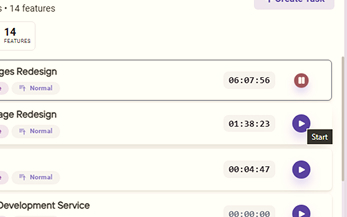
One-Click Timer
Start and stop tracking with a single click from anywhere
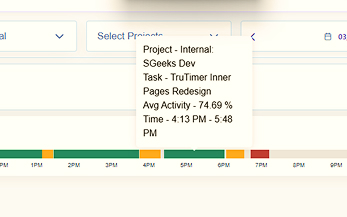
Idle Detection
Automatically pause when you're away and resume when you return

Manual Time Entry
Add or edit time entries for work done offline or in the past
Smart Features for
Accurate Time Tracking
TruTimer provides precise and secure time synchronization across your infrastructure—ensuring accuracy, consistency, and reliability for enterprise environments.
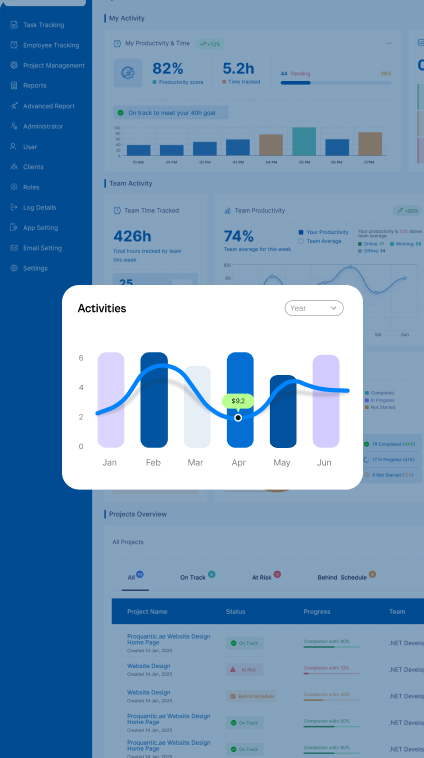
Everything at a glance
Get a complete overview of your team's productivity, project progress, and time allocation. The intuitive dashboard brings all your important metrics together in one place.
- Real-time updates
- Performance Metrics
- Customizable widgets
AI-Powered Analytics
Transform your time data into actionable insights. Our AI-powered reports analyze your productivity patterns, identify bottlenecks, and provide recommendations to help you work smarter.
- Smart Analytics
- Custom Reports
- Export Anywhere
Manage your Team Effectively
Keep your team aligned and productive with powerful management tools. Monitor activity, set permissions, track attendance, and ensure everyone is working on the right priorities.
- Activity Monitoring
- Attendance Tracking
- Role-Based Access
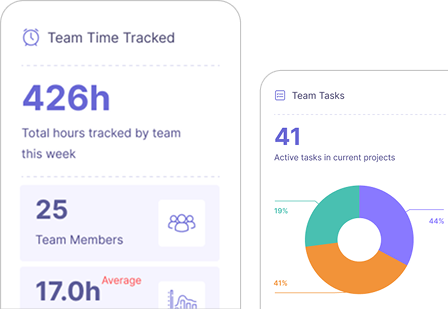
All the Tools and Insights You Need
to Succeed

Effortless Time Tracking
Track time automatically with one-click start/stop and idle detection.

AI Productivity Insights
AI-powered insights into team productivity and performance.

Team Activity Overview
Monitor team activity and productivity with real-time updates.

Detailed Time Reports
Generate detailed reports and export data for billing and analysis.
Get started in 3 Simple Steps
From signup to insights in minutes. No complex setup required.

Jira
Track time directly on Jira issues and sync work logs automatically.

Redmine
Seamlessly integrate time tracking with your Redmine projects and tasks.

Azure DevOps
Connect with Azure DevOps boards and track time on work items.

TruTimer Native
Use TruTimer's built-in project management with no external tools needed.
Frequently Asked Questions (FAQs)
Answering your most common queries, one at a time. For everything else, we're just a call away.
How does TruTimer support remote and hybrid teams without micromanaging?
Development timelines vary depending on the complexity of the app. Before we start on your project, we assess your requirements and the features your app would require. A simple app can take 3-6 months, while more complex.
What are TruTimer's key integrations with common project management tools?
TruTimer integrates seamlessly with popular tools like Jira, Asana, Trello, Monday.com, Slack, and more. These integrations allow automatic time tracking linked to tasks and projects.
How does TruTimer provide verifiable data for client billing and timesheets?
TruTimer captures activity screenshots, app usage data, and precise time logs that serve as verifiable proof of work. This data can be exported for client billing and timesheet reporting.
Does TruTimer compromise employee privacy or damage team trust?
No. TruTimer is built with privacy-first principles. Screenshots and monitoring are optional, configurable by admins, and employees are always aware when tracking is active.
How does TruTimer help us improve team productivity and project profitability?
By providing real-time insights into how time is spent, TruTimer helps identify inefficiencies, optimize resource allocation, and ensure projects stay on budget.
What data security measures does TruTimer have in place to protect our organization's information?
TruTimer uses enterprise-grade encryption, machine fingerprinting, client certificates, and obfuscated payloads to ensure your data remains secure and compliant.
Real Stories From Teams Using Our
Platform Every Day
Sristhi
5 days ago
"This platform has completely transformed how we manage time across our team. The real-time tracking and productivity insights give us clear visibility into where our time goes and how we can work more efficiently."
John Sinha
2 days ago
"The insights we get from this platform have helped our team understand how work happens day to day. It's made time tracking simple while improving overall productivity."
Ananya Roy
1 week ago
"We've seen a 30% improvement in project delivery times since adopting TruTimer. The automated tracking eliminates manual entries and gives our managers real data to work with."
Rahul Mehra
3 days ago
"Managing offshore teams used to be our biggest challenge. TruTimer's activity monitoring and reports have made it effortless to maintain accountability across time zones."